

How to Copy & Paste a Clash of Clans Base (Fix link not working, common issues)
🔄 Last Updated: February 24, 2026 |
✏️ What changed: Added TH18 war base link, updated all layouts for February 2026 meta, added Earthquake Spell Tower placement note, expanded troubleshooting section
Copying a Clash of Clans base looks straightforward — tap a link, hit Copy Base, done. In practice, a significant portion of layout links floating around forums and social media are outdated, TH-mismatched, or simply broken. Even valid links can fail if your app version is behind or you’re selecting the wrong village type.
This guide covers the full process: how base copying actually works, step-by-step troubleshooting for when it doesn’t, and a set of tested war base links for TH10 through TH18 — including the new TH18 layouts updated for the February 2026 meta.
How Base Copying Works in Clash of Clans
Supercell’s layout link system lets players share a base design encoded in a URL. When you open a valid link, CoC reads the building positions and replicates them in your edit layout screen. The process has three hard requirements:
- Town Hall match: You can only copy bases at or below your current TH level. A TH10 player cannot copy a TH12 base — the game rejects it immediately.
- Correct village type: Home Village links and Builder Base links are not interchangeable. Selecting the wrong one will fail silently or produce a distorted layout.
- Valid, current link: Supercell updates occasionally change how layout IDs are read. Links shared before a major update may no longer load correctly in the current game version.
When all three conditions are met, copying works reliably. Most failures trace back to one of these three issues — not the link itself.
Step-by-Step: How to Copy a CoC Base
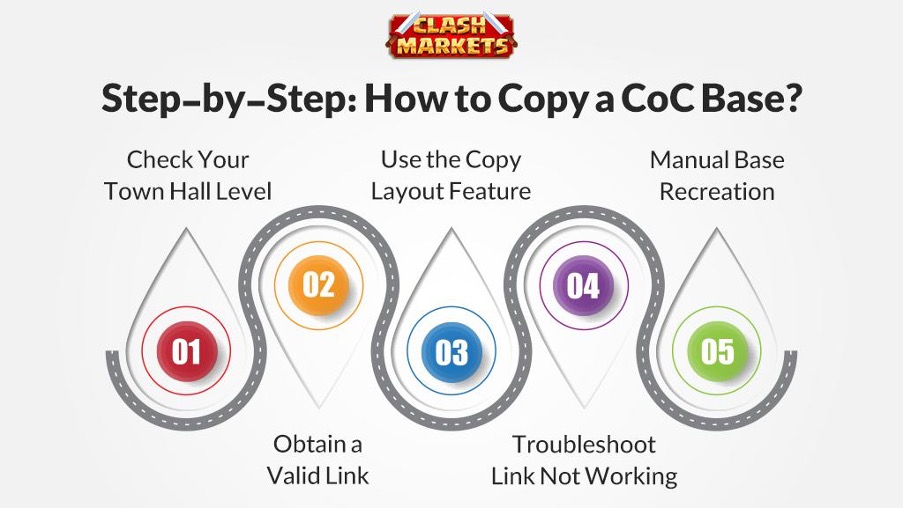
Step 1 — Confirm Your Town Hall Level
Check the TH level shown in the base link URL. The format is always TH##:WB: at the start of the layout ID. If it’s higher than your current TH, find a matching layout — upgrading your TH first is the only other option.
Step 2 — Open the Base Link
Tap the link directly on your phone. It should open CoC automatically and navigate to the layout preview screen. If the link opens a browser instead, copy the URL and paste it into CoC’s in-game browser, or open it from the device where CoC is installed.
Step 3 — Select Village Type and Copy
- In the layout preview screen, confirm Home Village is selected (not Builder Base)
- Tap “Copy Base”
- The layout will appear in your saved layouts — apply it from your village’s edit mode
Step 4 — Verify Trap Placements
Trap positions are encoded in the link but reset to their original positions when placed — they don’t copy your upgraded trap levels. After applying a layout, manually check that Giant Bombs, Spring Traps, and Seeking Air Mines are in the correct spots shown in the original. This step is often skipped and leads to weaker defense than the original layout provides.
Troubleshooting — When the Link Doesn’t Work
| Problem | Most Likely Cause | Fix |
|---|---|---|
| Link not working at all | TH level mismatch | Find a layout matching your TH level |
| Layout appears distorted or incomplete | App version outdated | Update CoC to latest version |
| “Copy Base” button grayed out | Connection or server issue | Restart app, switch Wi-Fi/mobile data, try again |
| Builder Base layout copied wrong | Wrong village type selected | Select Builder Base on layout screen |
| Link opens browser, not CoC | CoC not set as default handler | Open link from within the CoC app or share via device |
Tested War Base Layouts — TH10 to TH18 (February 2026)
All layouts below have been selected and tested by the Clash Markets team. Each is a war base (WB) optimized for Clan War defense. Tap the link on your phone to open it directly in CoC.
….
Copy Link vs. Manual Recreation — Which to Use
| Method | Pros | Cons | Best Use Case |
|---|---|---|---|
| Copy Link | Fast, exact building placement | Requires TH match and valid link | Competitive layouts, war bases |
| Manual Recreation | Works for any layout, no link needed | Time-consuming, room for error | Broken links, fully custom bases |
| Screenshot Guide | Good visual reference | Approximate placement only | Copying from videos or social media |
The most reliable approach is combining both: copy the link for building placement, then manually verify and adjust trap positions using a screenshot of the original. This takes 3–5 extra minutes but ensures your war base performs as intended.
Tips for Efficient Base Copying
- Always update CoC before copying. Supercell’s major updates (like the February 2026 patch) can change how layout IDs are parsed. An outdated app may fail on links that work fine for other players.
- Test links before war day. Copy and check the layout at least 24 hours before a Clan War starts — not when the war is already running and your base is locked.
- Keep a screenshot backup. Even when a link works today, it may not work after the next update. Screenshot the final layout so you can rebuild manually if needed.
- Customize slightly for your defense levels. A base designed around Level 12 Inferno Towers at TH18 won’t perform the same way if yours are Level 10. Move high-damage defenses to the most protected position for your actual levels, not the original designer’s.
- Check CC troops. Layout links don’t set your Clan Castle troop request. After copying, immediately request the correct CC troops — typically a mix of Super Witch, Barbarian, and Inferno Dragon for TH17–18 war defense in the current meta.
Our TH17 and TH18 accounts come set up with competitive war layouts from day one. No base-building required.





Leave a Reply